EAFree
One Click
MT5 EA that shows your account's total risk in money and sets stop-loss across all open trades in one click.
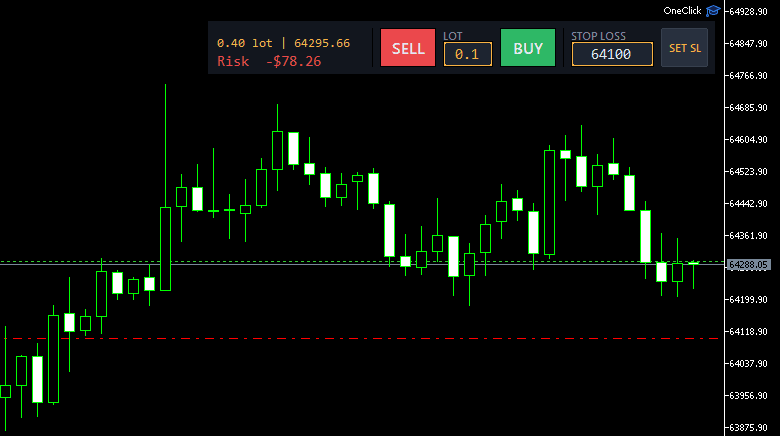
Features
- Open BUY/SELL orders right on the chart with a custom lot size.
- Show total Risk in money — combined P/L if every trade hits its SL; warns when a trade has no SL.
- Set stop-loss across all trades on the same symbol with a single button.
- Display total volume and average entry price of open positions.
- Open trades with a preset SL (type a price into the SL field) or without one.
- Validates the SL automatically — correct side and broker's minimum distance.
- Panel docks to any of the 4 corners; options to hide info/labels, set default lot, toggle sound.
- Each chart keeps its own values — survives timeframe changes and EA reloads.
Guide
- Download OneClick-v1.19.ex5 to your computer.
- Open MetaTrader 5, go to File → Open Data Folder → MQL5 → Experts.
- Copy the .ex5 file into the Experts folder, go back to MT5 and right-click Navigator → Refresh.
- Fastest way: double-click One Click in the Navigator — the panel pops up on the current chart instantly, no drag-and-drop needed.
- (Or just drag One Click from the Navigator onto a chart.)
- When the dialog appears, tick "Allow Algo Trading" and click OK; make sure the Algo Trading button on the toolbar is on.
- Note: test on a demo account before going live.
Inputs
- Panel position (PanelCorner)
- dock the panel to one of the 4 chart corners. Default: top-right.
- Hide info (HideInfo)
- hide the tab showing lot | average entry and Risk.
- Hide labels (HideLabel)
- hide the LOT and STOP LOSS captions above the two fields.
- Enable sound (EnableSound)
- play a sound on a successful / failed order or SL set.
- Default lot (DefaultLot)
- lot pre-filled in the LOT field when the EA is attached. Default: 0.01.
- Max lot (MaxLot)
- blocks any order larger than this lot; set 0 to disable. Default: 0.10.
- Horizontal margin (MarginX)
- distance (px) from the panel to the left/right edge. Default: 8.
- Vertical margin (MarginY)
- distance (px) from the panel to the top/bottom edge. Default: 20.
Got questions?
I'm always excited to collaborate on innovative and exciting projects!
E-mailhuyq09@gmail.com
Phone0834 564 869